

Results
🥈 Runner-up out of 14 teams in a Google-sponsored hackathon, with stakeholders highlighting its strong user focus and accessible design.
🤝🏻 80% of test users found the navigation intuitive and accessible, completling tasks with out assistance.
🚀 If implemented, the solution could reach 10,000+ users within target demographic within 6 months.
Overview
As part of a Google-sponsored Industry Hackathon, our team was challenged to design a solution that empowers underprivileged communities by improving ease of access to information, education, and digital tools—ultimately increasing accessibility to essential services.
With only 24 hours to ideate, prototype, and present, we focused on creating an inclusive, user-centered solution that bridges gaps in digital literacy and resource accessibility.
Problem
While digital connectivity is a modern necessity, a generation of seniors—specifically those navigating the early stages of Alzheimer’s—has been systematically left behind by our tech-driven society.
Having bypassed the digital literacy curve in their early stages of life, these users now face a compounded accessibility crisis: they must navigate interfaces designed for digital natives while simultaneously managing short-term memory loss and declining processing speeds.
This creates a cycle of digital isolation, where even basic essential functions—like accessing the Internet—become sources of profound frustration and cognitive fatigue.
Solution
We decided to focus on a solution that would help individuals with Alzheimer's feel a sense of empowerment and independence with regards to their access to online services. The design solution we developed was Google Kandula, a web dashboard aimed at providing those with Alzheimer's the ability to relearn daily interactions of their favourite websites through repeatable on screen prompts and the ability to track their last known progress on a website.
Strategic Empathy & User Synthesis
In the high-velocity environment of a 24-hour sprint, our research phase was driven by applied empathy. While quantitative data provided the demographic foundation, our qualitative insights were sharpened by the lived experiences of some of our team members who serve as primary caregivers for those with Alzheimer's.
By leveraging this, we moved beyond generic accessibility standards to identify the invisible friction points of cognitive decline. We didn't just look for ease of use; we looked for cognitive safety. This allowed us to map the emotional journey of a user who—having missed the digital revolution—now faces a world of interfaces that rely on recall rather than recognition, a critical failure point for those managing short-term memory loss.
Secondary Research
Based on the quantitative research below, we were able to gain a better understanding of our target demographic, being users with Alzheimer's disease. We uncovered data that not only validated the "why" in our design decisions but also highlighted key cognitive barriers and dependency shifts that our users might have. All of this was driven through our deep roots in empathy and inclusive design.
Digital Scaffolding
Higher use of digital technology correlates with a 58% lower risk of cognitive impairment. (News Medical)
Invisible Caregiving
Nearly 12 million unpaid caregivers provided an estimated 19.2 billion hours of care for people with Alzheimer’s. (NIH/PMC)
Recognition over Recall
65% of people living with dementia are women, and prevalence is expected to rise to 1.4 million by 2040. (ADI)
Competitive Analysis
To ground our solution in reality, we performed a sentiment analysis of existing Google ecosystem reviews. Our goal was to identify where current accessibility standards fail the cognitive needs of users with Alzheimer’s. We synthesized hundreds of negative touchpoints and were able to determine the main challenges that users face.
Discovery Gap
Current accessibility tools are often buried deep within complex nested menus. For a user with short-term memory impairment, the cognitive tax required to find and activate a support feature often creates a "dead stop" before the experience even begins.
Performance Instability
Accessibility overlays frequently triggered system lag or crashes likely due to high-processing demands or unoptimized code. For seniors, a frozen screen isn't just a bug; it's a source of profound confusion and anxiety that leads to immediate abandonment.
Lock-In Effect
Convoluted user interface settings and unclear exit paths often leave users trapped in an accessibility setting they don't want. Without a clear mental model for reversing actions, users lose the sense of confidence required to explore digital tools freely.
Defining the Cognitive Landscape
Direct clinical testing with Alzheimer's patients was not feasible. To ensure our solution remained grounded in reality, we utilized a Constraint-Based Design approach, mapping our features to the primary clinical symptoms of early-to-mid stage dementia. This allowed us to pivot from "designing for seniors" to designing for cognitive support.
Short-Term Memory
The inability to recall recent events or activities means that any user flow requiring a multi-step mental model will fail.
We implemented Zero-State Persistent Navigation and contextual breadcrumbs to ensure the user always knows where they are and how they got there.
Repetition Loop
Users with Alzheimer’s often repeat questions because the cognitive bridge between short-term and long-term memory is broken.
We integrated an Asynchronous Feature that logs previous interactions, almost like a checkpoint that validates their progress without requiring them to restart.
Processing Latency
Tasks take longer not because of physical speed, but because of the Cognitive Load required to decode complex user interfaces.
We prioritized Recognition over Recall by using literal, high-contrast iconography and removing all non-essential decorative elements that contribute to visual noise.
The Digital Hesitation
Through our research, I identified that older congregants, who often prefer traditional giving methods, resist digital tithing due to security concerns, fear of errors, or a sense that apps lack the reverence of physical offerings. Only 29% of this demographic currently use giving apps. To ease the transition, I incorporated familiar metaphors and biometrics to minimize any unnecessary complications. By designing with accessibility guidelines in mind, I ensure that the design is as functional as it is aesthetic. Framing the app as a tool for easier faithfulness—not just convenience—helps bridge the gap between tradition and technology.
User Persona

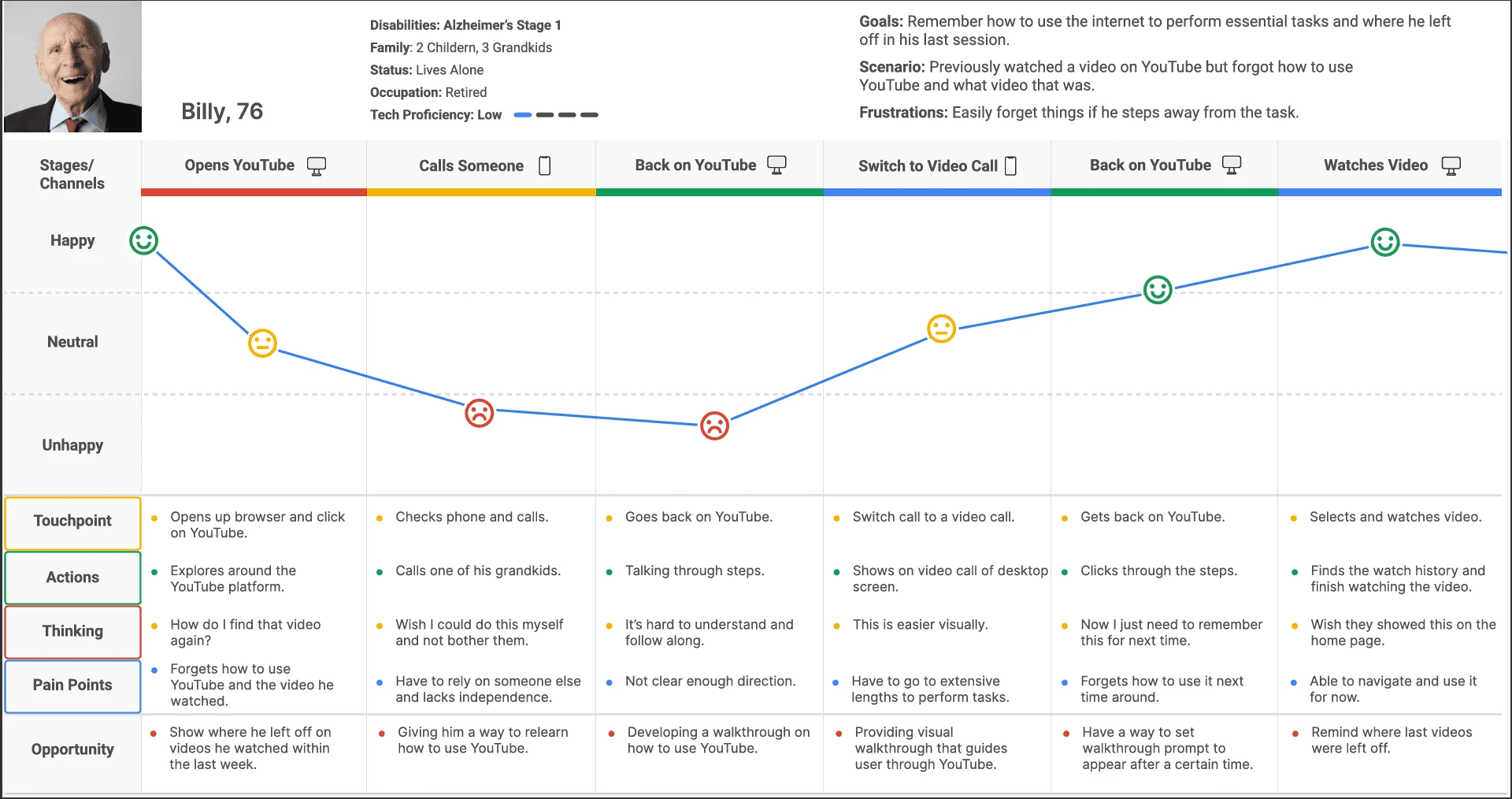
Billy Bennet, 76
Retired Librarian & Community Volunteer
"I’ve always taken pride in handling my daily tasks on my own, but lately, the world feels like it’s moving faster than I can keep up with. I just want to be able to handle my time on the Internet without feeling like I’m failing a test every time I get on the computer."
Pain Points
High drop-off rates from task interruptions.
Inability to convert short-term interactions into long-term muscle memory.
Frustration and anxiety from interaction looping.
Needs
Persistent visual cues that guide user flow without requiring memory of the previous steps.
Zero-jargon descriptions that focus on the outcome of the function.
Ability to calibrate and personalize their user experience to their needs.
Behaviours
Only engages with digital platforms when assistance is available due to fear of irreversible technical errors.
Relies on physical notetaking to bridge the digital gap.
Gravitates towards interfaces that mirror the physical world.
Emotional Journey Map
To visualize Billy's experience, we mapped his emotional and cognitive state across a standard task flow. Our goal was to identify the specific drop-off points where memory failure leads to emotional distress, and where Visual Learning Interventions could bridge the gap.
Phase 1 - The Recognition Gap
To visualize Billy’s experience, we mapped his emotional and cognitive state across a standard task flow. Our goal was to identify the specific drop-off points where memory failure leads to emotional distress, and where Visual Learning Interventions could bridge the gap.
Phase 2 - The Dependency Pivot
As frustration peaks, Billy shifts from digital exploration to Social Dependency, seeking external assistance. This is a critical emotional low point where the "Technical Gap" transforms into a sense of social shame and loss of autonomy.
From a UX perspective, this reveals an opportunity to intervene with a "Self-Service" support layer that replaces verbal instructions with persistent visual cues, effectively reducing the "Cognitive Debt" placed on the user’s support network.
Phase 3 - The Synthesis Breakthrough
The emotional trajectory shifts toward relief during the Visual Synthesis phase, as Billy transitions from abstract navigation to following a visual walkthrough. This validates the core hypothesis that for those with Alzheimer's, Recognition over Recall is the only viable path to success.
By providing a real-time visual overlay, we bypass the need for procedural memory, allowing Billy to complete complex tasks through direct observation rather than memorized steps.
Phase 4 - Empowerment & Validation
The journey concludes with a restored sense of independence and individuality. Successful task completion provides more than just its intended purpose; it offers psychological validation and diminishes the fear of "breaking the technology."
From a UX perspective, this phase is the most vital, as it demonstrates that the design solution has effectively moved the user from a state of digital isolation to one of confident, independent engagement.
Task Flow Analysis
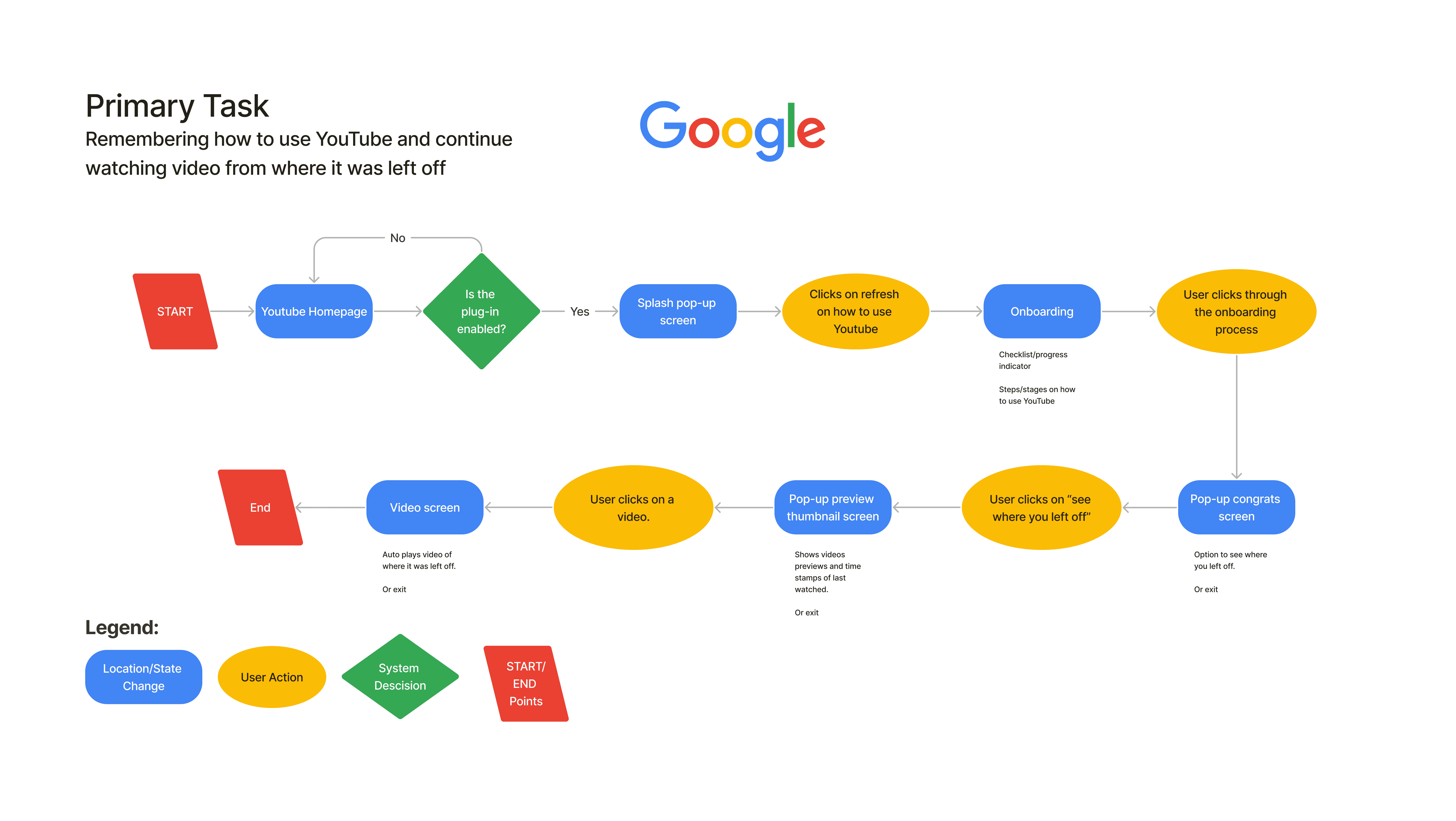
To solve the friction of Recall Failure, we architected a task flow that prioritizes Recognition-based navigation. This flow isn't just a path that the user has to navigate independently with a set of instructions but rather a guided journey between the system and the user, ensuring that the burden is shifted entirely from the user to the interface.
Sketching the Experience
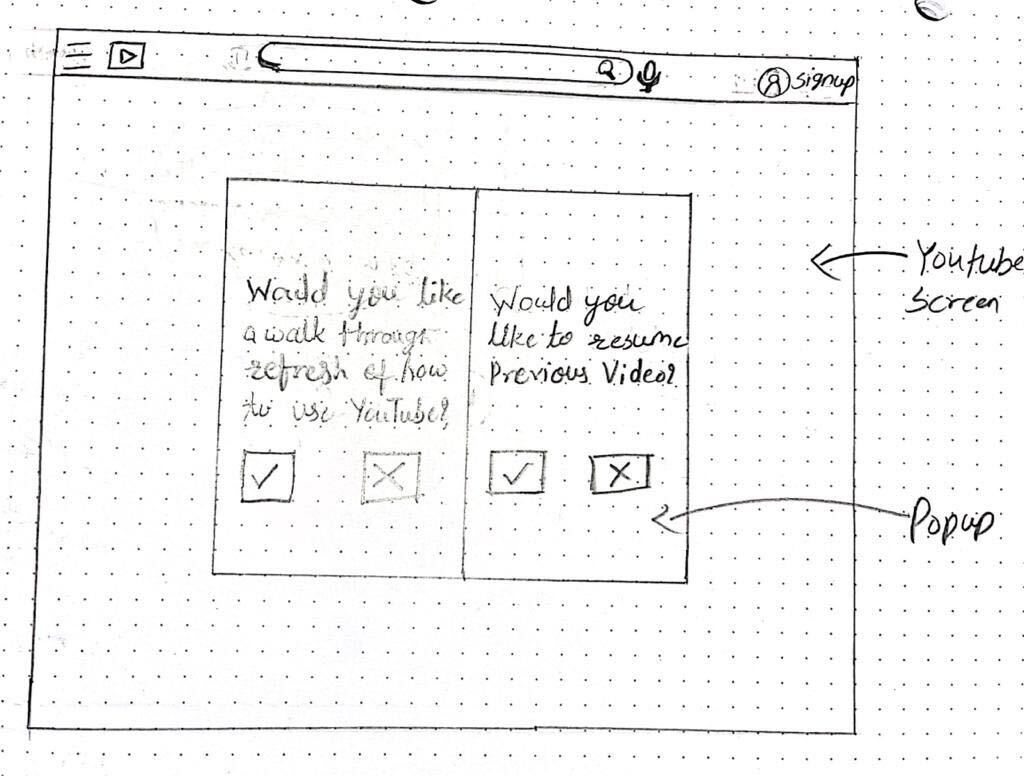
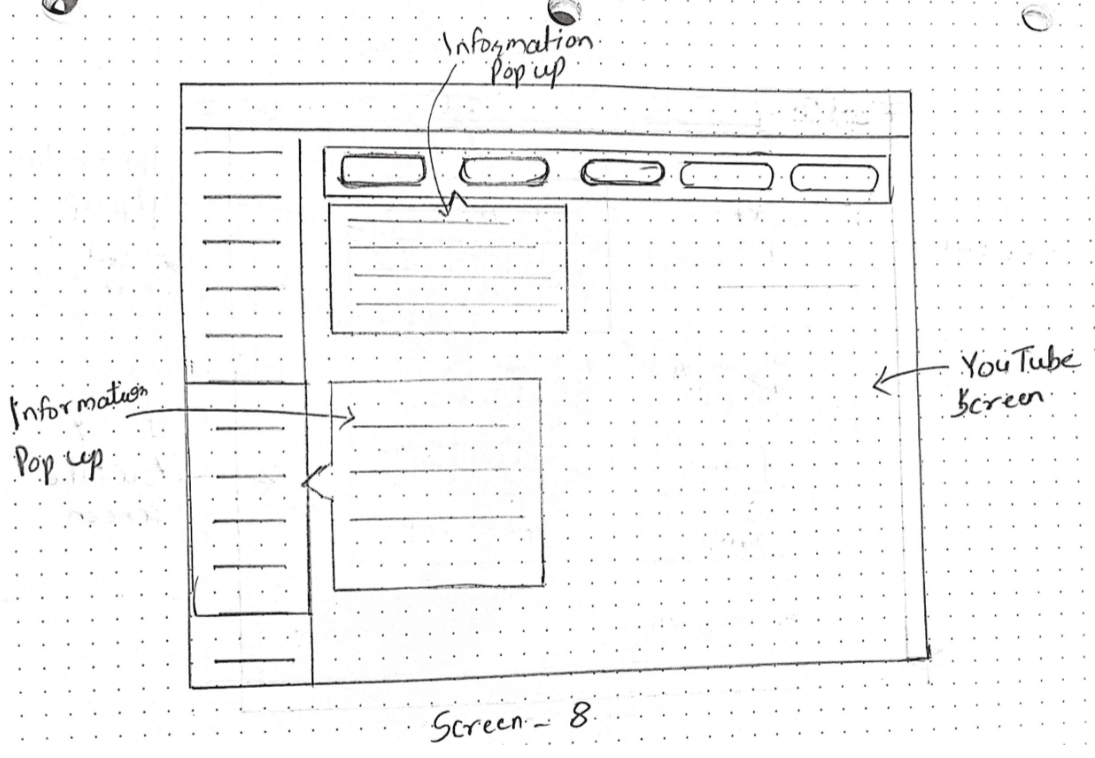
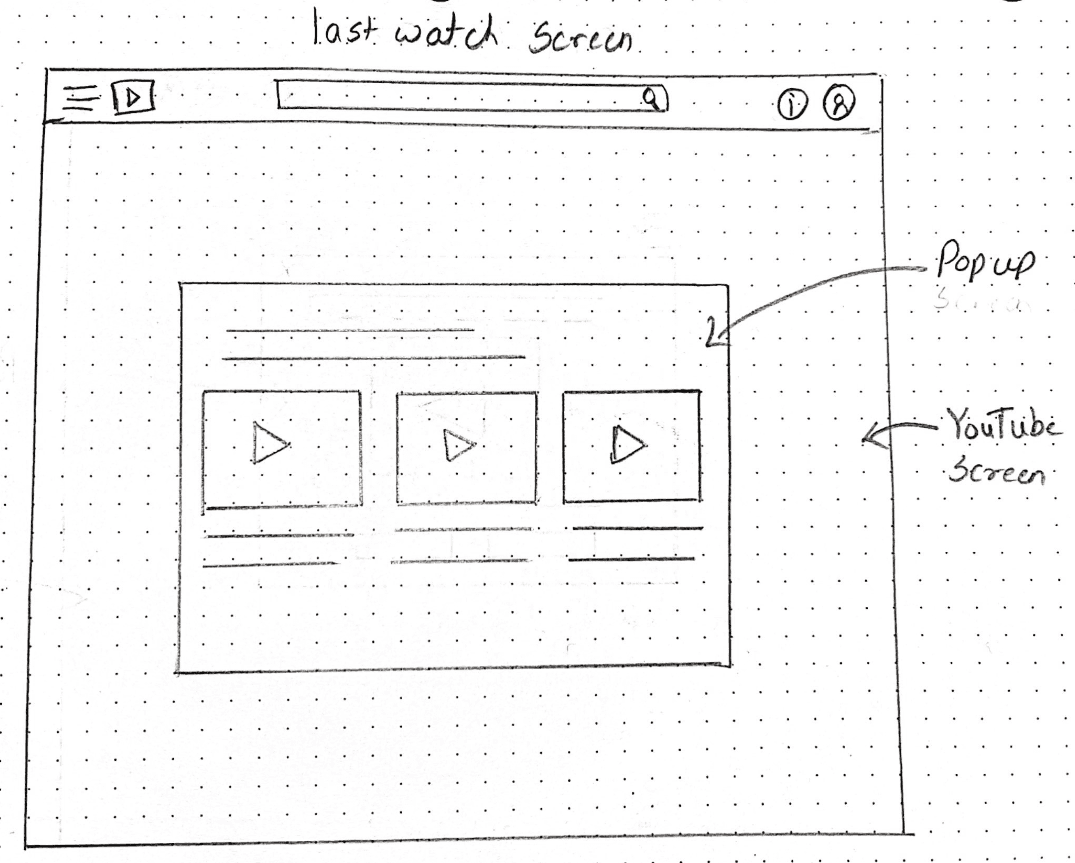
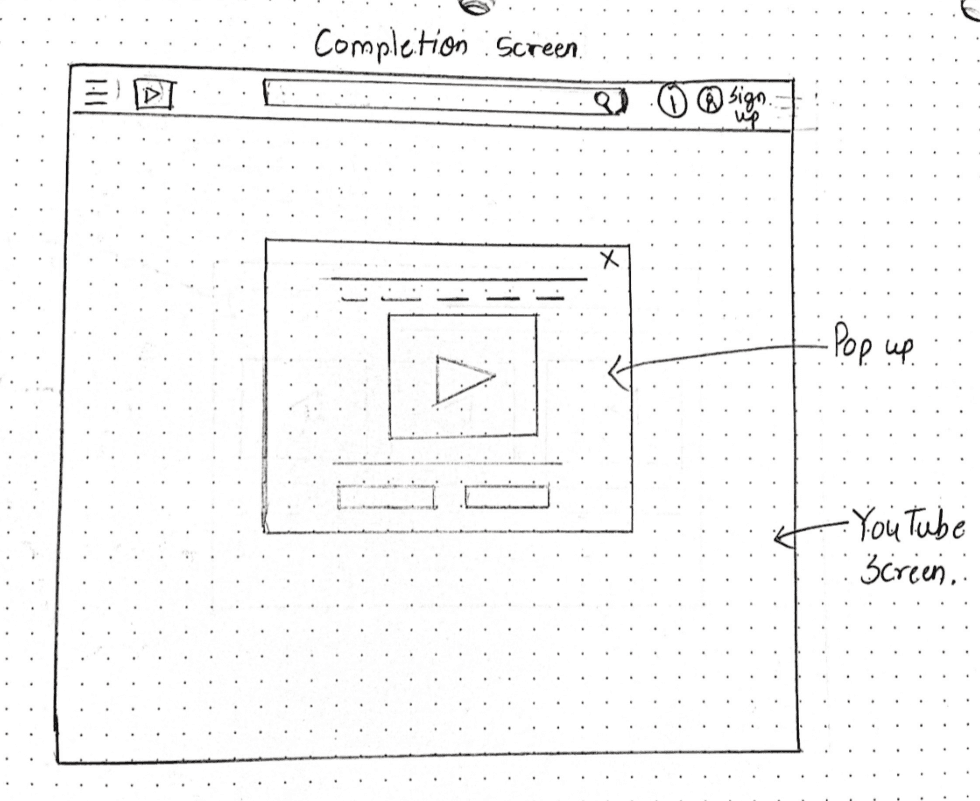
We utilized sketching as a low-fidelity tool to pressure-test our hypothesis. By working on paper, we could quickly iterate on component placement—specifically focusing on how to overlay a simplified support layer atop a complex existing platform without causing further confusion.
We experimented with modal positioning to ensure that support features were unavoidable but non-intrusive, ensuring they appeared at the precise moment required. Also, we mapped out the "spatial relationship" between the help overlays and the underlying YouTube content, ensuring the transition felt like a cohesive extension of the platform rather than a disruptive pop-up.
Wireframing
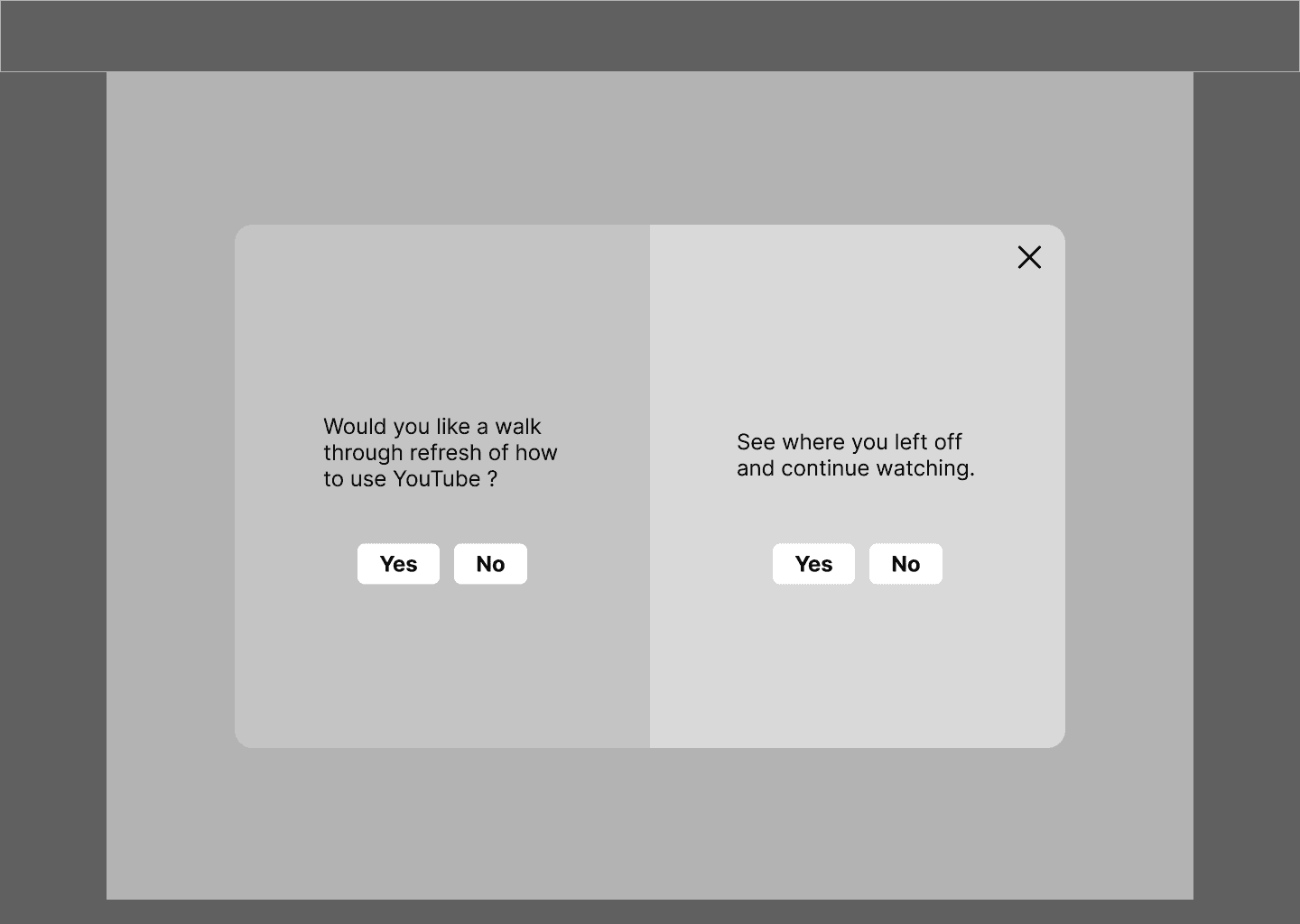
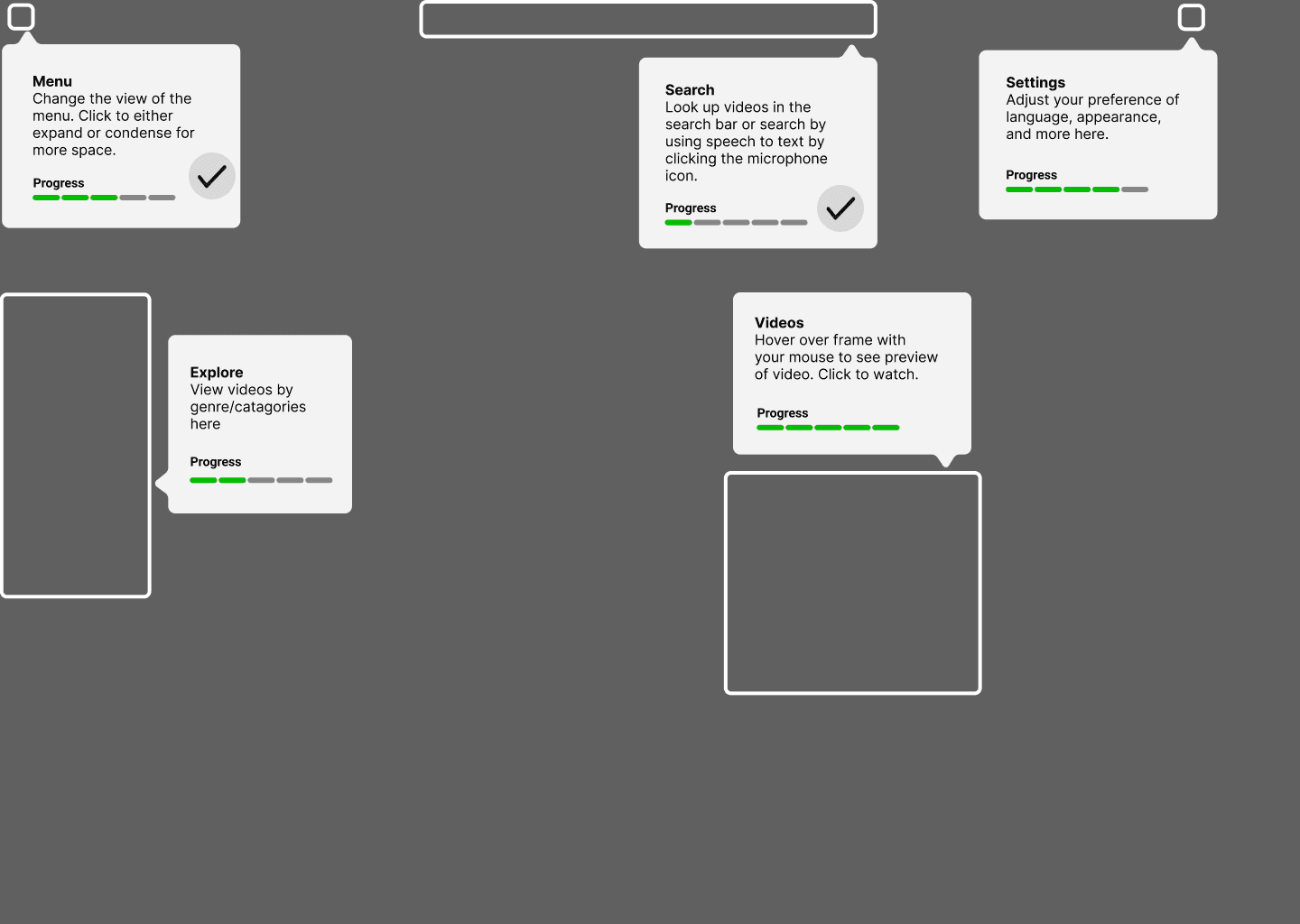
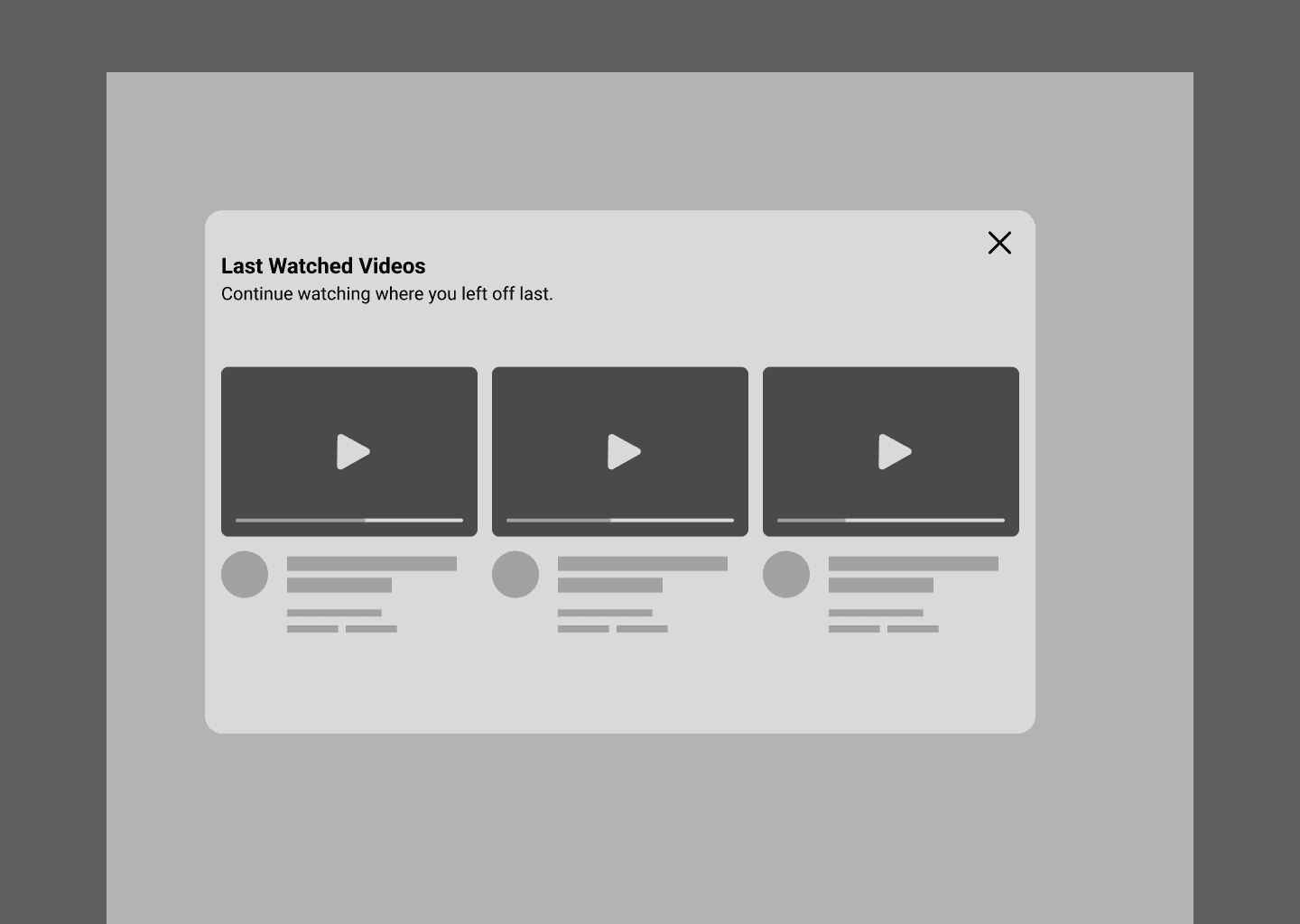
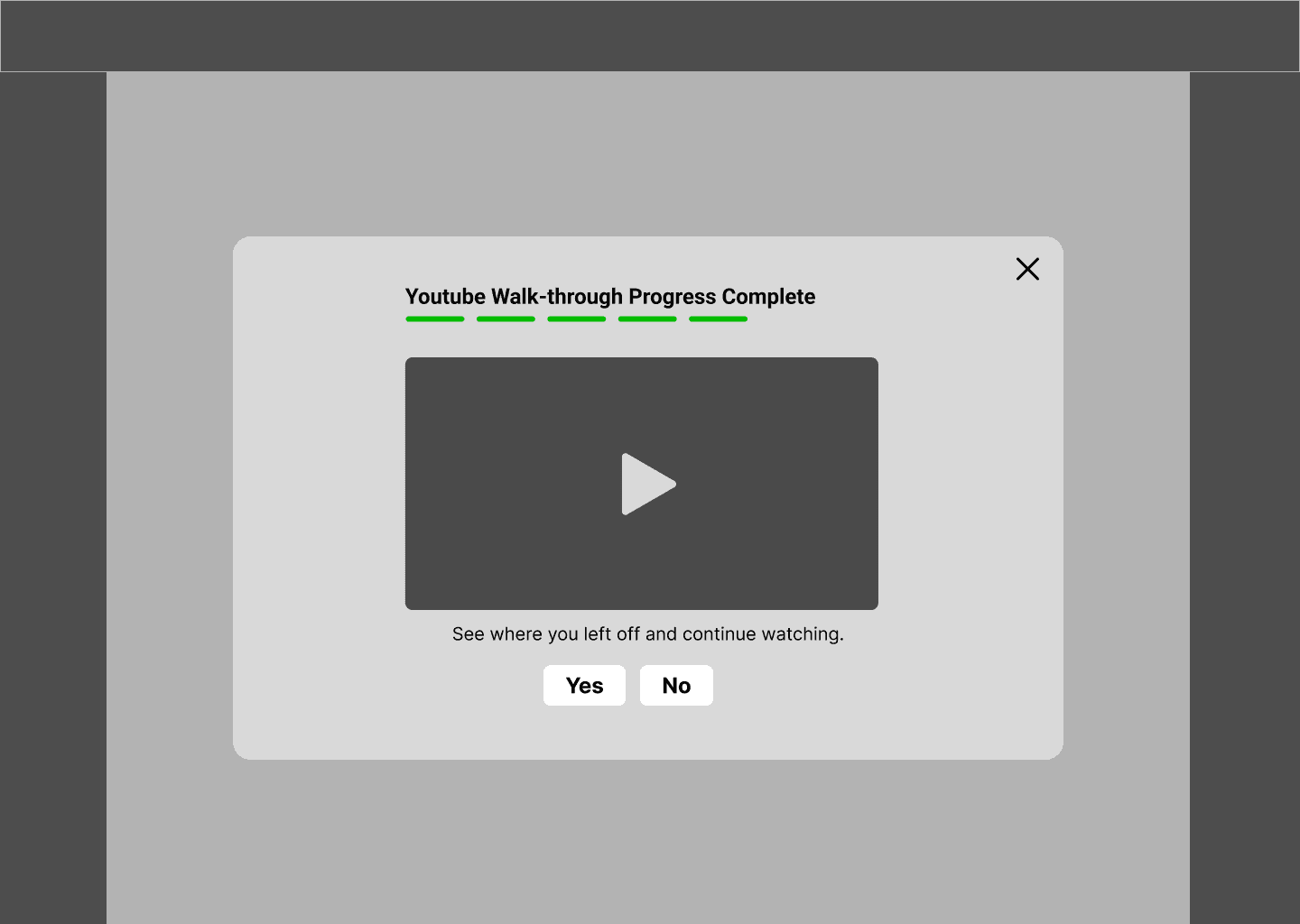
Transitioning from sketches to wireframes allowed us to establish a formal Information Architecture optimized for users with Alzheimer’s. By stripping away imagery and colour, we were able to focus on the Spatial Consistency and Interactive Affordance of the support overlays, ensuring that the interface provides a sense of "digital safety."
We focused on establishing Cognitive Safety to minimize interaction cost and sensory overload. We prioritized a binary modal architecture that utilizes high-contrast and minimal decision making to narrow the user's attention. This paired with persistent Progress Scaffolding to act as an external memory aid.
By optimizing touch targets and favouring explicit, literal text over abstract iconography, we successfully shifted the user experience from a high-recall effort to a Recognition-based flow, ensuring every element serves as a visual indicator for users.
High-Fidelity Prototype
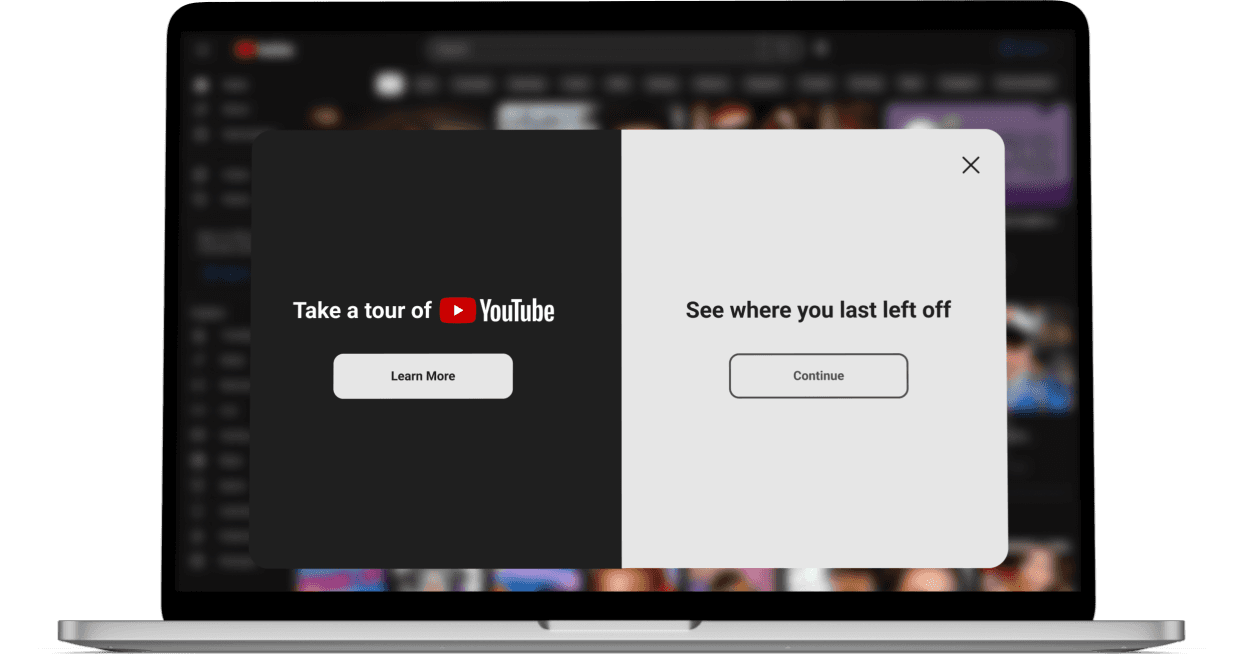
In the final phase, we translated our wireframes into a high-fidelity prototype that adheres to Google’s Material Design 3 system while layering in specialized accessibility modifications. The visual design was not merely about aesthetics; it was a strategic use of Colour Theory and Typography to enhance legibility and reduce the emotional stress associated with "getting lost" in a digital interface.
Reflections
Designing for Cognitive Safety
Beyond standard WCAG accessibility, this project taught me the importance of designing for the user’s emotional state. We identified that for users with Alzheimer's, the primary barrier isn't just a lack of skill, but the psychological friction of feeling incapable. By designing "Cognitive Guardrails," we shifted the narrative from a user failing the interface to an interface that proactively supports the user.
The Efficiency of Evidence-Based Design
Without the luxury of long-term user testing, we relied on leveraging team members' direct caregiving experiences with those with Alzehimer's and our secondary research. This reinforced my belief that we must be both the researcher and the advocate; by grounding our design decisions in the pathology of memory loss, we moved from a state of guessing to problem-solving.
Scalability & The "Voice-First" Future
If given the opportunity to iterate further, I would move toward a multi-modal ecosystem. While our visual overlays provided a strong cognitive bridge, integrating Voice-User Interfaces (VUI) would allow for a hands-free experience that further reduces the motor-skill tax on seniors. This project reinforced that true inclusion isn't about adding features—it's about removing the barriers that prevent human connection.